
We drew the same lists in Chrome, Firefox and WebKit, read each marker's position from the pixels, and recorded which ::marker rules each engine applied.
Try it in your browser
This is a real list on this page, so it shows what your browser does.
- A short item.
- A longer item that runs on to a second line, so you can see where the wrapped text starts in each position.
- Another short item.
Text in the first item starts 0px from the edge of the list item in your browser.
What ::marker applies
We set one property at a time on li::marker, drew the list, and compared the pixels with the same list without the rule.
| Property | Chrome | Firefox | WebKit |
|---|---|---|---|
| color | Applied | Applied | Applied |
| font-size | Applied | Applied | Applied |
| font-family | Applied | Applied | Applied |
| font-weight | Applied | Applied | Applied |
| font-style | Applied | Applied | Applied |
| line-height | Applied | Applied | Applied |
| direction | Applied | Applied | Applied |
| animation | Applied | Applied | Applied |
| content | Applied | Applied | Ignored |
| text-transform | Applied | Applied | Ignored |
| text-shadow | Applied | Applied | Ignored |
| letter-spacing | Applied | Ignored | Applied |
| word-spacing | Applied | Ignored | Applied |
| white-space | Ignored | Applied | Ignored |
These changed nothing in any engine: background-color, opacity, visibility, text-decoration, margin, padding, border, outline, box-shadow, width, height, display, position, transform, rotate, filter, text-indent, text-align and vertical-align. The CSS Lists draft says such properties “should not have an effect on the marker box”, and all three engines obey it.
A feature test won’t catch WebKit ignoring content. CSS.supports("selector(::marker)") returned true and getComputedStyle reported the string we set, while the page kept drawing the original number.
Firefox reports font-family: -moz-bullet-font for a disc. Setting another family on ::marker redrew the bullet in Firefox and left it alone in Chrome and WebKit. A bulleted line was also 24.5 pixels tall in Firefox, against 24 for a numbered one.
What markers take from the list item
Color, font properties and letter-spacing on the li reached the marker in all three engines. That includes Firefox, which ignored letter-spacing set on ::marker itself. text-transform on the li never reached it, because the draft requires browsers to set text-transform: none on markers.
An underline on the li never touched an outside marker. It did underline an inside marker in Chrome and Firefox, but not in WebKit. text-shadow on the li reached numbers in Chrome and Firefox only, and a ::first-line color reached an inside marker only in Firefox.
Where the marker lands
The draft leaves this open: “CSS does not specify the precise location of the marker box”. A note beside that sentence calls it “handwavey nonsense from CSS2”. We measured in 16 pixel Arial on a 24 pixel line. Text start is the distance in pixels from the left edge of the li.
| Measurement | Chrome | Firefox | WebKit |
|---|---|---|---|
| Bullet width, outside | 5 | 5.25 | 5 |
| Bullet to text, outside | 11 | 8.25 | 11 |
| Number to text, outside | 5.75 | 5.75 | 9.75 |
| "x " to text, outside | 4.75 | 4.75 | 4.75 |
| Text start, inside bullet | 22 | 15.37 | 14 |
| Text start, inside number | 17.8 | 17.8 | 17.78 |
| Text start, inside "x " | 12.45 | 12.45 | 12.44 |
With outside, text stayed at the edge of the li and wrapped lines stayed under it. With inside, the marker takes room on the first line and wrapped lines go back to the edge. Numbers and strings started within a fraction of a pixel of each other across the engines, and bullets were 8 pixels apart.
WebKit set outside numbers 4 pixels further from the text than Chrome and Firefox. It did the same for an @counter-style marker (8.75 against 4.75) and left plain strings alone.
Larger text
The gap grows with the font size, at a different rate in each engine.
| Engine and marker | 12px text | 16px text | 24px text | 48px text |
|---|---|---|---|---|
| Chrome, bullet | 10 | 11 | 14 | 21 |
| Chrome, number | 4.25 | 5.75 | 8.75 | 17.5 |
| Firefox, bullet | 6.25 | 8.25 | 12.25 | 24.75 |
| Firefox, number | 4.25 | 5.75 | 8.75 | 17.5 |
| WebKit, bullet | 10 | 11 | 14 | 21 |
| WebKit, number | 7.25 | 9.75 | 15.75 | 31.5 |
A big marker also moves the text. ::marker { font-size: 48px } on a bullet took the item from 24 to 35 pixels tall in Chrome.
Long numbers
The default indent is 40 pixels in all three engines, and three digits fit inside it. The left edge of a four-digit number sat 43.75 pixels left of the text in Chrome and Firefox and 47.75 in WebKit, which is past the edge of the list.
What moves it
padding-left on the li moved the text and left the marker where it was, so the bullet gap went from 11 to 31 pixels with 20 pixels of padding in Chrome. Every engine added exactly the padding. margin-left moved both together. text-align: center moved only the text, leaving an outside bullet at the left edge, while an inside bullet traveled with it. dir="rtl" mirrored bullets at the same gap.
list-style-image has no size control. A 40 pixel SVG drew at 40 pixels and made the item 47 tall in Chrome. An SVG with no size of its own drew at 7 pixels in Chrome and WebKit and 6.25 in Firefox.
When the marker goes missing
The layout of the item, and of its first child, can remove a marker or move it to its own row.
| Layout | Chrome | Firefox | WebKit |
|---|---|---|---|
| Child overflow: hidden, outside | Drawn | Drawn | Missing |
| Child overflow: auto, outside | Drawn | Drawn | Missing |
| Child overflow: clip, outside | Drawn | Drawn | Missing |
| Child display: flow-root, outside | Drawn | Drawn | Drawn |
| Child overflow: hidden, inside | Drawn | Drawn | Drawn |
| li display: flex | Missing | Missing | Missing |
| li display: block | Missing | Missing | Missing |
| ul padding 0, overflow hidden, outside | Missing | Missing | Missing |
| ul padding 0, overflow hidden, inside | Drawn | Drawn | Drawn |
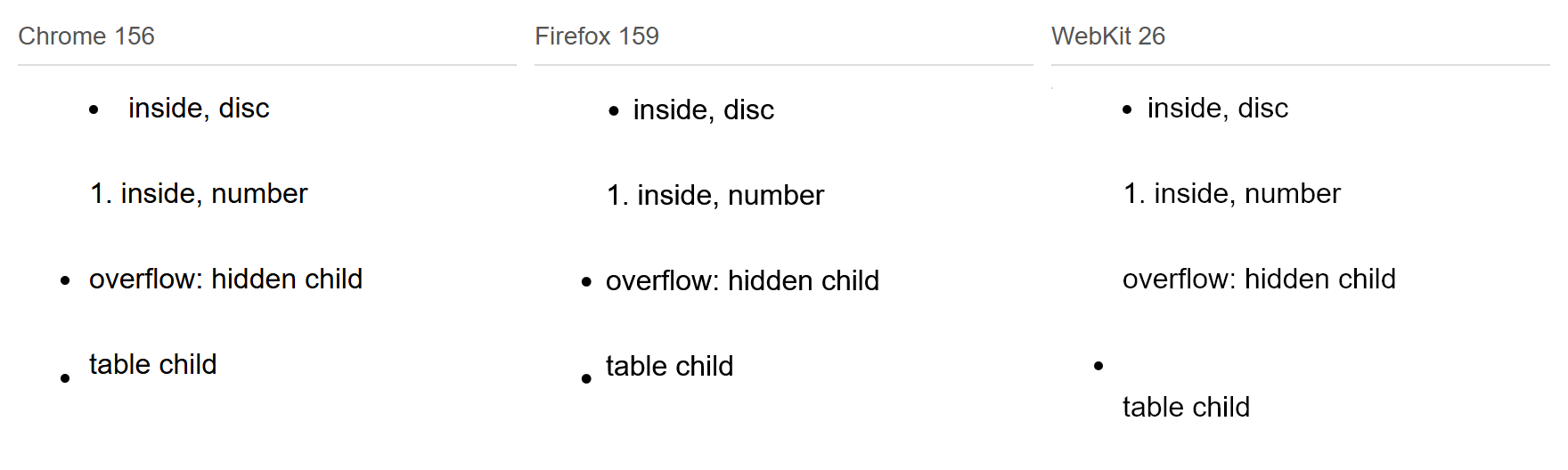
WebKit dropped outside bullets and numbers whenever the first child had overflow set to hidden, auto or clip. Chrome and Firefox kept them. If the overflow is there to contain floats or margins, display: flow-root also creates a block formatting context, and it kept the marker in all three.
A table as the first child gave a different result. WebKit put the marker on its own row and the item grew to 48 pixels. Chrome and Firefox kept one row and drew the bullet lower than usual: its top was at 17 pixels in Chrome, against 10 for plain text.
With inside, a block child (a div, p, flex or grid container, or table) pushed the text to the row below the marker in all three. An inline-block child stayed on the marker’s row. With outside, the marker followed the first line of text inside div, p and h2 children, flex and grid included.
The triangle on summary
A summary computed to display: list-item with list-style-type: disclosure-closed and inside in all three engines, so its triangle is a marker.
| Measurement or rule | Chrome | Firefox | WebKit |
|---|---|---|---|
| Triangle width | 9 | 7.5 | 11 |
| Text start | 16.94 | 14.08 | 18.22 |
| list-style: none | Removed | Removed | Removed |
| display: block | Removed | Removed | Removed |
| ::marker color | Applied | Applied | Applied |
| ::marker content | Applied | Applied | Ignored |
| list-style-type: "x " | Applied | Applied | Applied |
| ::-webkit-details-marker hidden | Kept | Kept | Kept |
list-style: none removed the triangle everywhere. The older ::-webkit-details-marker selector did nothing in our WebKit build, and CSS.supports returned false for it in all three. We did not run Safari, so if you keep that selector for older versions, check it there.
 Photo by sasha semenko
The CSS to use
/* Color and weight worked in all three. */
li::marker { color: #c7322b; font-weight: 700; }

/* A custom symbol. The trailing space is the gap. */
.plus { list-style-type: "+ "; }

/* More room between marker and text. */
.roomy li { padding-inline-start: 0.5em; }

/* Room for four-digit numbers. */
ol.long { padding-inline-start: 4em; }- Keep the indent if the list has
overflow: hidden. An outside marker sits in that space and gets clipped with it. - Skip
::markermargins and padding, since no engine applied them. Pad theliinstead, or change the spaces in a string marker:"x"with no space left 0.25 pixels and"x "left 4.75. - If the position must be identical everywhere, set
list-style: noneand draw the bullet with an absolutely positioned::before. Our 0.5em dot landed in the same box in all three engines. Check the list’s semantics if you do: WebKit bug 170179, filed in 2017, reports VoiceOver not announcing a list styled this way. A WebKit engineer wrote there that the change was purposeful and recommended an explicit ARIA role. We ran no screen reader test.
How this was tested
A script ran 273 cases through each engine on 8 November 2026, on Windows 11, at 4x device scale. A marker has no DOM box, so each case was drawn twice, once with its text hidden, and every dark pixel in the hidden drawing counted as marker. Text positions came from a DOM Range. Pixel readings have a resolution of a quarter of a CSS pixel.
- Chrome 156.0.8078.80, headless.
- Firefox 159.0.1, headless.
- WebKit 26.0 from Playwright 1.56.1. This build is not Safari, it ran on Windows rather than a Mac, and nothing here was run on an iPhone.
For what else separates these engines, see our engine comparison. The full output is available as raw JSON. The test script and this article were prepared with help from AI.
How this used to work
CSS2 in 1998 had display: marker and a marker-offset property for the gap. CSS 2.1 has neither. MDN’s compatibility data lists ::marker from Firefox 68, Chrome 86 and Safari 11.1, and when we checked on 8 November 2026 it still limited Safari to color and font-size. WebKit 26 applied more than that in our run, including font-weight, font-family and line-height.
Common questions
How do I color a bullet without coloring the text?
Use li::marker { color: ... }. It worked for bullets and numbers in all three engines and left the text alone.
Can I hide a marker from ::marker alone?
Yes. color: transparent and font-size: 0 both hid it in all three engines. content: none worked only in Chrome and Firefox.
Why did my bullets disappear when I set display: flex on the li?
A marker needs display: list-item. Block, inline, flex, grid and table values on the li all removed it in the three engines. Put the flex container inside the li instead.