
Apple no longer makes Safari for Windows. We ran Playwright's WebKit build against Chrome on Windows 11 and recorded what it can tell you about Safari, and what it can't.
Check your own browser
Open this page in WebKit on your PC with npx playwright wk https://gunlaug.no/safari-on-windows/, then on a real iPhone if you can reach one, and compare the readings.
This browser, right now:
| Check | This browser |
|---|
What you get on Windows
npx playwright install webkit downloads the browser and npx playwright wk followed by a URL opens it in a window. Playwright says its WebKit is built from WebKit’s main branch and can’t drive Apple’s branded Safari. Its documentation also says that, for video playback for example, “for the closest-to-Safari experience you should run WebKit on mac”.
The version follows your Playwright install. Our lab’s Playwright 1.56.1 ships WebKit 26.0. Playwright 1.65.0, the newest on npm on 8 November 2026, lists WebKit 27.2, and Apple’s release notes were at Safari 27.2 with 27.3 in beta the same day. Everything below describes the 26.0 build. Update Playwright before you rely on it yourself.
| Check | Chrome | WebKit | WebKit, iPhone 15 profile |
|---|---|---|---|
| Version | 156.0.8078.80 | 26.0 | 26.0 |
| User agent claims | Windows NT 10.0 | Macintosh; Intel Mac OS X 10_15_7 | iPhone OS 17_5 |
| navigator.platform | Win32 | Win32 | Win32 |
| navigator.vendor | Google Inc. | Apple Computer, Inc. | Apple Computer, Inc. |
| navigator.maxTouchPoints | 0 | 0 | 0 |
| (pointer: coarse) | No match | No match | Matches |
| Layout width with no viewport tag | 1000px | 1000px | 980px |
| 100vh and 100dvh | 800px, 800px | 800px, 800px | 659px, 659px |
| env(safe-area-inset-top) | 0px | 0px | 0px |
The desktop build’s user agent claims a Mac while navigator.platform says Win32, so a page that reads both gets two answers.
Where it matched Chrome
We measured 24 boxes and positions on one page using grid, subgrid, flexbox, an automatic table, aspect-ratio, vertical text, line clamping, hyphenation, container queries, :has() and CSS nesting. 17 were identical. One flex item differed by 0.02 pixels. A <button> set to display: flex was 25 pixels tall in WebKit and 21 in Chrome. That moved its own child and pushed the four boxes under it down by 4 pixels. Arial text measured the same width in both, since both read the same font from Windows.
20 of 28 CSS feature checks and 15 of 31 API checks gave the same answer. For layout code this makes it a useful first check.
Where it differed
| API | Chrome | WebKit |
|---|---|---|
| MediaSource | Yes | No |
| MediaRecorder | Yes | No |
| getUserMedia | Yes | No |
| WebRTC | Yes | No |
| Web Share | Yes | No |
| PaymentRequest | Yes | No |
| Push | Yes | No |
| WebGPU | Yes | No |
| Speech synthesis | Yes | No |
| ApplePaySession | No | No |
A “No” in this column says nothing about Safari. Apple’s Safari 26 release notes list WebGPU as added, and this 26.0 build had no navigator.gpu. Playwright warns that features tied closely to the platform vary between operating systems. Apple Pay needs Safari on Apple hardware, so no Windows browser can test it.
Eight CSS checks differed. WebKit accepted -webkit-backdrop-filter, hanging-punctuation and -webkit-initial-letter, and Chrome didn’t. Chrome accepted initial-letter, interpolate-size, corner-shape, text-size-adjust and -webkit-text-size-adjust, and WebKit didn’t.
new Date("11-08-2026") gave a date in Chrome and Invalid Date in WebKit. Four other date strings matched. We expect this one to carry over to Safari because it comes from the script engine, but we couldn’t confirm that here.
Fonts
| font-family | Chrome | WebKit |
|---|---|---|
| system-ui | Segoe UI | Times New Roman |
| -apple-system | Times New Roman | Times New Roman |
| Helvetica | Arial | Arial |
| monospace | Consolas | Courier New |
A stack that starts with system-ui drew in a serif face in this build. Apple fonts aren’t on a Windows PC, so nothing here shows the text a Mac or iPhone reader sees, or how it wraps.
Form controls
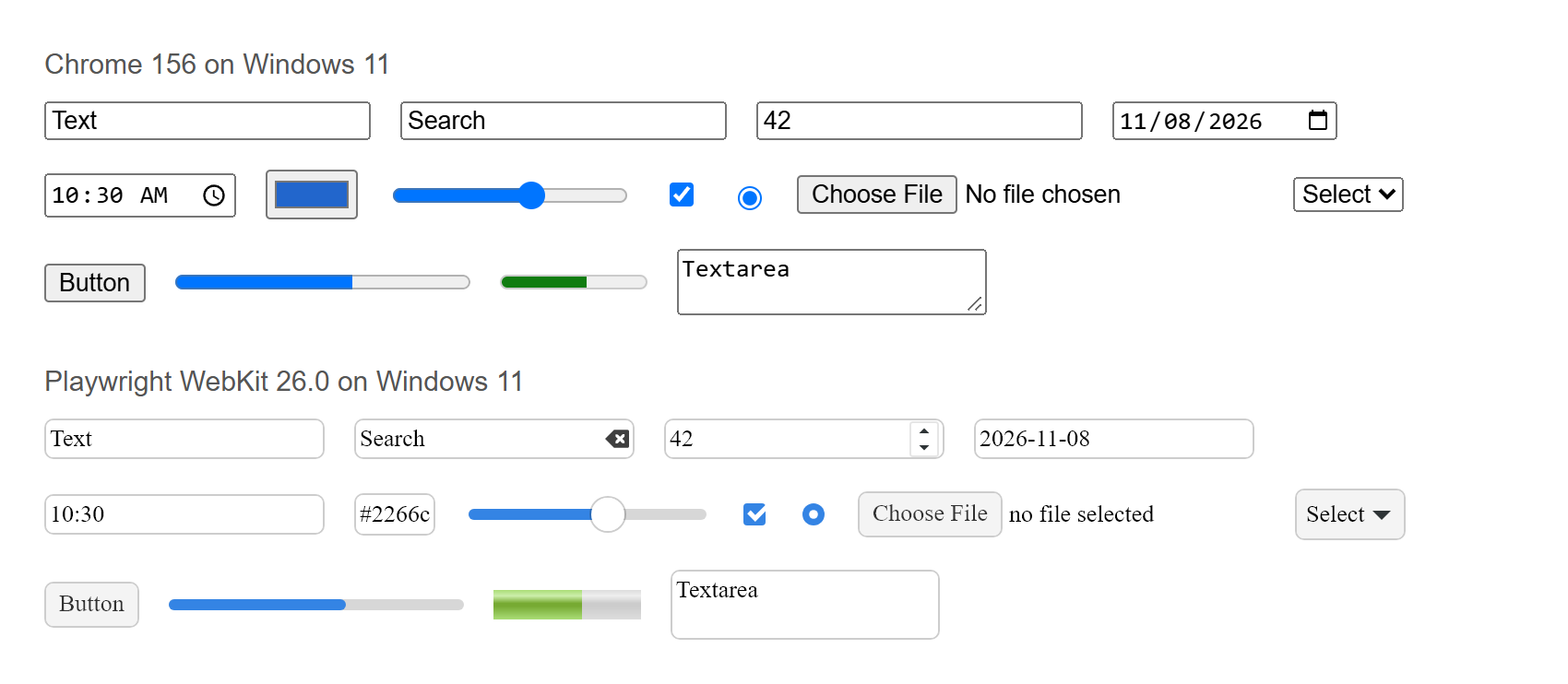
| Control | Chrome | WebKit |
|---|---|---|
| Text input | 177 × 21 | 152 × 22 |
| Date input | 122.33 × 21.33 | 152 × 22 |
| Select | 60 × 19 | 60 × 28 |
| Button | 54.55 × 21 | 51.41 × 25 |
| Progress bar | 160 × 16 | 160 × 6 |
Chrome used Arial at 13.33 pixels. WebKit asked for MS Shell Dlg at 13 pixels, and drew its date, time and colour inputs as plain text fields. Style your controls explicitly and leave the defaults out of any visual baseline taken from this build.
Video and images
| Sample | Chrome | WebKit |
|---|---|---|
| H.264 in WebM | Played | Did not load in 8 seconds |
| VP9 in WebM | Played | Did not load in 8 seconds |
| VP8 in WebM | Played | Did not load in 8 seconds |
| AV1 in MP4 | Played | Played |
| AVIF image | Decoded | Did not decode |
canPlayType answered “probably” for all six formats we asked about, in both browsers, and WebKit still stalled on the WebM clips. H.264 stayed untested, because Chrome’s recorder gave us no usable file.
 Photo by Dane Amacher
What the iPhone profile changes
Playwright’s devices["iPhone 15"] changes the settings around the same Windows build. It gave us a 393 by 659 viewport, a device pixel ratio of 3, touch events, (hover: none), and the 980 pixel fallback on a page with no viewport tag. Those are worth testing, and Playwright calls this emulation.
The platform stayed Win32 and maxTouchPoints stayed 0. All four viewport units came back as 659 pixels, since there is no address bar to collapse, and safe areas were 0. The feature list matched desktop WebKit apart from Notification and device orientation. The user agent read iOS 17.5 next to Version/26.0, a combination from Playwright’s device list.
What it cannot tell you
- How text, tap targets and the on-screen keyboard behave on an iPhone.
- How
svh,lvhand fixed elements react as Safari’s toolbars move. See fixed and sticky positioning. - How fast the page is on a phone.
- Whether a bug exists in one shipped version of Safari, since this is a separate build.
- Anything involving Apple Pay, or Apple fonts.
Chrome on an iPhone is normally WebKit as well. App Store guideline 2.5.6 requires WebKit for browsers, with an entitlement for other engines in the EU and Japan.
The other options
| Option | What runs | What it settles | What you need |
|---|---|---|---|
| Playwright WebKit on Windows | A WebKit build, on Windows | Layout and JavaScript differences, in automated runs | Node.js. Free |
| A Mac you own or borrow | Safari itself, and iOS simulators through Xcode | Safari on the Mac, with Web Inspector | macOS Tahoe 26.6 or later for current Xcode |
| A rented Mac | The same, reached remotely | The same, with no iPhone in your hand | A lease of at least 24 hours, for development and testing |
| A borrowed iPhone | Safari on real hardware | Touch, keyboard, toolbars, real speed | A Mac as well, if you want Web Inspector |
| A paid real-device cloud | Whatever the vendor connects | Real-device behaviour, if the device is physical | A subscription. We have not used one |
Apple documents inspecting an iPhone through Safari on a connected Mac, with Web Inspector switched on in the phone’s settings. Simulators come with Xcode, free on the Mac. Apple’s older Simulator guide warns that it doesn’t measure performance, memory or network speed accurately.
Apple’s macOS Tahoe licence allows leasing for development and testing work, for at least 24 consecutive hours, with one customer in sole control of the machine, so expect to rent for a full day at minimum. The same licence doesn’t allow macOS on hardware that isn’t Apple-branded, which rules out a macOS virtual machine on your Windows PC.
We have not bought a real-device cloud, so this page doesn’t compare or recommend any. Before paying, ask whether the iPhones are physical or simulators, which iOS versions are on offer, and whether you get Web Inspector.
How to do it
- Update Playwright, run
npx playwright install webkit, and add WebKit to your test run. It runs well alongside the checks in what to test. - Use it for layout, JavaScript and feature-detection logic.
- Branch on
CSS.supports()and on whether an API exists, and leave the user agent out of it. - When a failure appears, cut it down with a reduced test case and retest in WebKit.
- Before launch, load your forms, sticky headers and checkout on a real iPhone. An hour with a borrowed one is enough for a first pass.
- Test video and Apple Pay on Apple hardware only.
How this was tested
A script loaded one fixture page from a local server on 8 November 2026 on Windows 11, at 1000 by 800 pixels, and recorded feature support, measured boxes, fonts, playback and device readings.
- Chrome 156.0.8078.80, headless, through Playwright’s Chrome channel.
- WebKit 26.0 from Playwright 1.56.1, headless and once in a window, then again with Playwright’s iPhone 15 profile.
Fonts were identified by matching text width against fonts installed on the PC. No Safari, Mac, iPhone or paid service was used, and nothing here is a measurement of them. The full output is available as raw JSON. The test script and this article were prepared with help from AI.
How this used to work
Apple shipped Safari for Windows up to 5.1.7. Its support page says that was the last Windows version and that it no longer offers Safari updates for Windows.
Common questions
Can Chrome’s iPhone mode stand in for Safari?
No. With the iPhone profile, Chrome reported an iPhone user agent and still ran Chrome 156.0.8078.80. Chrome and Safari use different engines.
Can I run macOS in a virtual machine on my PC?
It can’t be done within Apple’s licence, which limits macOS to Apple-branded computers.
Is WebKit on Linux better than WebKit on Windows?
Playwright says Linux is usually the cheapest place to run it in CI and the Mac is the closest to Safari. We tested Windows only.
Sources
All checked on 8 November 2026.
- Browsers, Playwright
- Emulation, Playwright
- Inspecting iOS and iPadOS, Apple
- Installing Xcode and simulators, Apple
- Testing and Debugging in iOS Simulator, Apple
- Xcode support, Apple
- Safari release notes, Apple
- Apple Pay on the Web, Apple
- App Review Guidelines 2.5.6, Apple
- macOS Tahoe 26 software licence, Apple
- Update to the latest version of Safari, Apple